¶ 🗞️ Would you like to stay updated on product changes & releases?
👉 Subscribe to our special bot in Telegram 🔗 MyTaxiCRM | News & Updates

¶ 2026
¶ March
¶ 🗓️ WEEK #10
Full List of Upgrades 👉 LINK
Changelog for v1.76
- Integration of flights information into MyTaxiCRM:
- In the MyTaxiRides (Office Trips) built-in dispatch center, users will be able to see up-to-date information about transfers in a general trip log table;
- Added a «Flight Information» icon with details on the following elements: flight status, flight number, and international codes for departure & arrival airports;
- Automatic account for flight delays: when creating a trip linked to a specific flight number, the system will automatically factor in the actual estimated time of arrival, taking into account current flight delays, instead of the regular schedule time;
- Calculation of car pick-up time, taking into account the delay of the passenger's arrival from the airport: a new system setting has been added, allowing you to set a buffer (delay) for the customer's departure after landing at the airport, in order to take this delay into account when calculating the car pick-up time.
- Integration with the «Waze» navigation app. It has been added to the list of embded navigators in addition to «Google Maps» in the drivers' personal cabinet apps; automatic redirection and route planning have been implemented.
- Deepening integration with Google Maps tools – autocomplete and address suggestions now work not only when creating new orders, but also when making changes to existing ones.
- Improvements to the functionality of the «Live Map» section:
- Car icons, whose geolocation is not currently tracked, are now also clickable;
- A filter with multiple selection by vehicle registration numbers (numberplates) has been added to the side panel of the section;
- A visual legend has been added to the map.
- Added 🇦🇿 Azerbaijani localization of the Driver Portal app.
¶ February
¶ 🗓️ WEEK #8
Full List of Upgrades 👉 LINK
Changelog for v1.75
- What's new with MyTaxiRides (Office Trips):
- We have implemented flight tracking: now, when creating a trip through the built-in dispatch center, you can specify the Flight Number. The system automatically queries the flight and current arrival time, eliminating the need to manually check the airport arrival/departure board. This will help the driver and the company's management team to better understand the current situation and distribute the load correctly;
- Precise navigation: when selecting an addresses via Google search at the time of trip creation, the system records the exact coordinates of their points. Navigation icons have appeared in the Driver Portal. With the status «Started order» and «In Ride», the driver can go to the Google Maps app with one click with the route already plotted, which eliminates errors from manually entering the address.
- New functionality in the «Live Map» section:
- For fleets using seat sensors, visual indicators have been added directly to the map grid and to the side panel of the vehicle list. If the sensor detects a passenger but the vehicle status is still «Free», a red warning will appear above the vehicle icon;
- A filter by «Car online status» has been added. This allows you to focus, for example, only on cars that are currently available and not under order.
- The MyTaxiCRM user interface is now available in a new localization – 🇦🇿 Azerbaijani.
- Integration with «Bolt»: we redesigned the logic for determining driver statuses and the algorithm for calculating trips for this integration. This solved a number of problems, such as the number of trips not being displayed in the «Online» section, the driver status not working correctly, and the online time details being disrupted.
¶ 🗓️ WEEK #6
Full List of Upgrades 👉 LINK
Changelog for v1.74
- Further improvements to the built-in MyTaxiRides (Office Trips) dispatcher module:
- The Google Maps tools are now integrated – when you create a new order, the fields for entering both addresses (pick-up/drop-off) now support Google's smart search. You can select the exact locations from the drop-down list, which guarantees that the correct text address is sent to the driver's app;
- Added the ability to change the payment method for trips even after they are completed (for example, from «Cash» to «Counterparty» and vice versa);
- Driver auto-selection: when creating a new order, you only need to select a car (by its make/model or numberplate). If a driver has already been assigned to it via the Handover Act or scheduled in Timetable, the system will automatically add him/her to the order;
- In all form fields where monetary amounts are expected (for example, the «Amount» field when creating Office Trips orders), strict input character validation has been enabled. Fields now only accept numbers and points, blocking the input of letters and other characters.
- A universal tool for importing POS terminal transaction logs from providers that do not yet have direct integration with the MyTaxiCRM system. Simply use our standard register upload template to import information about all such transactions via the «Registers» section of the system.
- Native support for importing transaction file registries from «Geidea» POS terminals has also been added.
- Other minor improvements and changes worth noting:
- Added «Monthly» frequency option when setting up automatic vehicle usage charges (in Vehicle Usage Payment);
- In the «Online» section, the ability to sort vehicles by mileage (kilometrage) has been added;
- In the «Live Map» section, we've added the ability to filter by driver's name;
- We have improved the interface for switching between fleets within the same account of a company using our system (relevant for those who have geographically separated fleets or various fleet divisions based on other criteria). We have also added auto-fill and display functions for unique fleet IDs next to their names;
- Fixed synchronization issue for drivers of the «Uklon» ride-hailing platform «Uklon» via the «Integration Drivers» section (specific to Ukrainian 🇺🇦 market);
- Improved GPS data processing algorithms for the «QAT Etisalat» provider: increased accuracy of determining stops in the driver's movement history (Drivers Moving Details).
- We are delighted to present French 🇫🇷 and Spanish 🇪🇸 versions of our website (in addition to the global 🌐 English version and its Ukrainian 🇺🇦 counterpart).
¶ January
¶ 🗓️ WEEK #4
Full List of Upgrades 👉 LINK
Changelog for v1.73
- Updates in MyTaxiRides (Office Trips) built-in dispatch module:
- We have completely redesigned the Office Trip creation interface. Instead of one long form, a convenient step-by-step process (wizard) is now used;
- A «Concurrent trip» status notification has been added to the driver's cabinet. The driver will see a warning if they confirmed the start of a new order without completing the current trip;
- Integrators now have the ability to create completed Office Trips using the MyTaxiCRM's Open API.
- Toll Roads & Earnings. A new setting for financials is available: the ability to include «Toll Roads» compensation into the «Total Income». This ensures flexibility in salary calculations, especially for business models where toll road registry expenses are deducted from total income as shared expenses.
- Drivers' debt balances: now system allowes you to adjust a driver's debt balance even in the closed weeks.
- Implemented protection against price discrepancies. If the trip price has changed on the server, and the driver attempts to confirm, start, or reject the order with the old price, the app will return an error and require a page refresh.
- «Payroll & Balances» (previously known as «Revise»):
- A separate «Payroll & Balances» tab has been added to the drivers' card for quick access to their financial metrics without need to jump to the general finance section;
- Buttons to switch between drivers have been added inside the «Payroll & Balances» tab of driver's card. You can now move to the next or previous driver without returning to the general list;
💡 Press the ⌘ + K key combination (or Ctrl + K for Windows OS) to instantly focus on finding the driver you need. - A button for creating a manual transaction has been added directly to the weekly «Payroll & Balances» card, speeding up work with adjustments;
- The Profit Online» metric is now displayed in both the general «Payroll & Balances» list and the detailed weekly card.
- Integrations:
- Resolved an issue where connecting a new integration with the «Recalculate current week only» option could affect data from past periods. The system now strictly adheres to the selected recalculation timeframe;
- «Bolt» – driver's account card in MyTaxiCRM now displays the unique identifier from ride-hailing platform (e.i., the Bolt Individual Identifier a.k.a. UUID) instead of internal system's ID.
- MyTaxiGPS: support for passenger presence sensor data (seat sensors) for MyTaxiGPS trackers has been implemented.
- Transaction cancellation capabilities. Added the ability to cancel the following six (6) transaction types: «Voluntary Repayment», «Enforcement», «Other Fines», «Balance Write-off after Dismissal», «Car idle time», and «Over Speed».
¶ 2025
¶ December
¶ 🗓️ WEEK #52
Full List of Upgrades 👉 LINK
- New functionality of the (β) «Live Map» – color indication of vehicle statuses has been added, allowing you to instantly assess their occupancy and availability on the map itself:
- Blue car – the driver is directly fulfilling an order from one of the integrations or Office Trips;
- Green car – has an assigned driver who is waiting for an incoming request to carry out the trip;
- White car – has an assigned driver according to Timetable or Handover Act, but is not active (not waiting for orders, not online in the relevant integration or Office Trips apps);
- Gray car – has no assigned driver at all.
- If the same vehicle is in the process of executing an order in one of the integrations and is awaiting requests in the other(s) – its corresponding icon on the map will be blue, as this status has a higher priority (in this case, over green).
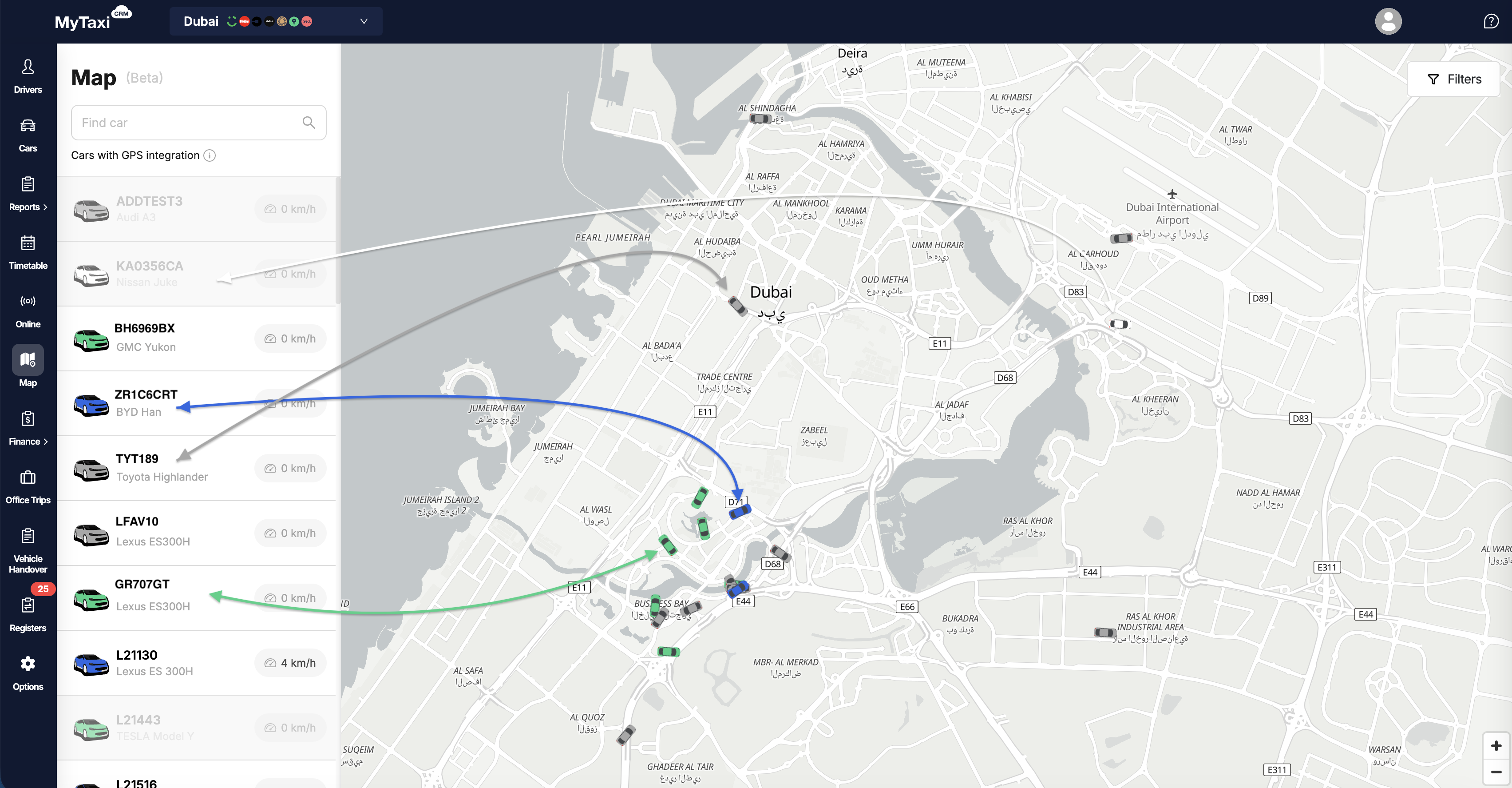
⚠️ Please note: this feature is in early release and is constantly being refined, so minor technical difficulties may occasionally occur.
- Displaying vehicle makes (brands) & models: the sidebar now includes the model/make of a specific car, in addition to its license numberplate;
- Added automatic map zoom function: the display area will automatically adapts to all or only filtered cars so that they fit within the frame of a single window.
- Improvements to the behavior & UI/UX of the MyTaxiCRM system:
- A new animation has been introduced – a fade out highlight effect when changing data in various lists. This provides visual confirmation that your changes have been successfully applied by the system;
- A alert about the need to synchronize drivers has been added to the sidebar of the «Drivers» section to improve your situational awareness;
- Added the ability to hide the «Finance» section in the driver's personal cabinet (app);
- In the «Driver Synchronization» section, the «Unlink integration» button is now blocked for 30 minutes after it is used. This is essential to ensure that the synchronization suspension processes are completed correctly in terms of recalculating related reports & payment statements;
- A new purpose of payment type has been added to the system – «Salary payment/advance»;
- Added the ability to delete transactions created based on «Park Payouts» & «Park Revenues» requests.
- Enhancing the MyTaxiGPS solution from MyTaxiCRM:
- The algorithms for processing data from the MyTaxiGPS devices and software have been improved. The accuracy of calculating mileage (kilometrage) and plotting route segments has been increased to ensure more accurate calculation of related overmileage penalties;
- Support for data from passenger presence sensors in the vehicle's cabin has been implemented for devices connected to the MyTaxiGPS solution.
¶ 🗓️ WEEK #50
Full List of Upgrades 👉 LINK
- Breakdown of toll roads & tips in the «Driver's Report Card»: we've added a way to see toll road charges for trips and tips received from passengers, with a detailed breakdown for each connected integration.
- Ignoring drivers during synchronization. The ability to hide unnecessary drivers from the synchronization list has been implemented. If your integrations include drivers who are not involved in the current operations of the vehicle fleet, you can add them to the ignore list so that you are not bothered by notifications about the need to sync them.
- Improvements to the «Office Trips» built-in dispatch center for vehicle fleets:
- Managers can now change the start and end addresses even in existing Office Trips rides;
- Added the ability to change the price of an Office Trips order that has not yet been completed;
- A calculator has been added to the trip cost change dialog box. Now, when adjusting order prices, you can use automatic calculation based on Price Matrix, knowing only the make/model of the car and the names of the locations;
- Users with the SUPERVISOR role can now independently assign and dismiss drivers from Office Trips they have created that are in the «Unassigned» or «Waiting to confirm» statuses;
- When creating an unplanned trip, a «Pick up notes» field has been added for customer requests or pick-up details, which the driver will see in their app.
ℹ️ This module of our MyTaxiCRM system will soon be rebranded as «MyTaxiRides», but will continue to be offered to system users without any changes: either as a feature within the selected subscription plan or as a separate module with its own cost.
- «Bolt» ride-hailing platform integration: the automatic synchronization time for drivers has been reduced to 10 min.
- «Payroll & Balances» section: added the ability to expand the details of tips for each integration. This information is available in the «Driver’s Earnings» & «Current Account» blocks.
- Added the ability to attach documents' photos when creating «Cash Out» type transactions.
- «MyTaxiGPS» solution from MyTaxiCRM: to generate routes and calculate mileage based on MyTaxiGPS data, the time when the device records coordinates is now used. This has made the display of drivers' routes without orders as accurate as possible.
- The search field in the driver list has been renamed and given a clarifying hint. It is now more obvious that drivers can be searched not only by name, but also by email address and phone number.
¶ November
¶ 🗓️ WEEK #48
Full List of Upgrades 👉 LINK
- We are pleased to announce a complete integration of MyTaxiCRM with a new service – «Zed» (specific to the 🇦🇪 Dubai, UAE market). Automatic drivers, vehicles (with registration-based search by VIN code), trips, and other details & information sync is now available. Also, the display of driver statuses and profits in online mode is supported.
- Improved «Wheely» integration:
- Possibility to start integration with the service directly from the MyTaxiCRM system interface has been added;
- The logic of the «Online» status for fleet drivers connected to this service has been changed. Now the status is linked to a specific driver (current_driver) rather than to a vehicle, which eliminates the problem of duplicate drivers working at a specific point in time.
- Technical improvements to «Bolt» integration:
- The frequency of driver synchronization with «Bolt» has been increased. The process will now occur every 4 (four) hours, accelerating the addition of new drivers to the MyTaxiCRM system for all fleets with this ride-hailing integration;
- We switched the acquisition of data on the earnings of the «Bolt» platform (using Open API) to identification by a unique driver code (UUID). This ensures that the data will be displayed correctly for all drivers, eliminating name matching errors.
- Further improvements to the sidebar of the (β) «Live Map» section:
- «Online» status indication added for connected integrations (ride-hailing platforms and services alike);
- Filter by brand (make) & vehicle model added;
- When you click on a specific car, info about the current driver is displayed in a new redesign.
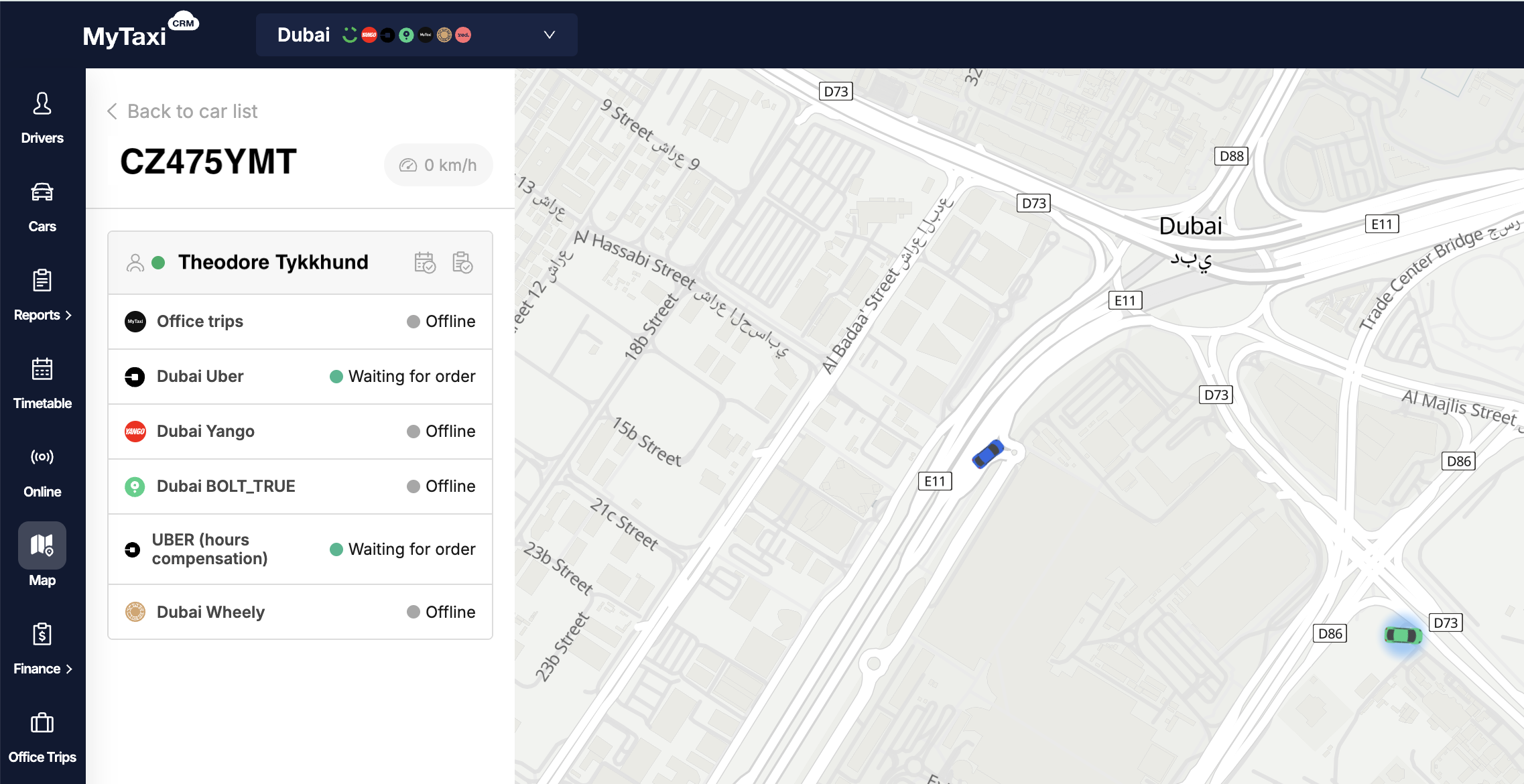
⚠️ Please note: this feature is in early release and is constantly being refined, so minor technical difficulties may occasionally occur.
👇 Major update to the «Integrations» section (side menu → ⚙️ Options → Settings → Integrations):
- The «Statements» tool has been moved to the «Integrations» section;
- Summarized statistics have been added. From now on, you can immediately see a list of all connected ride-hailing platforms and services alike, their statuses, and the amount of drivers (in total and connected to MyTaxiCRM) for each one.
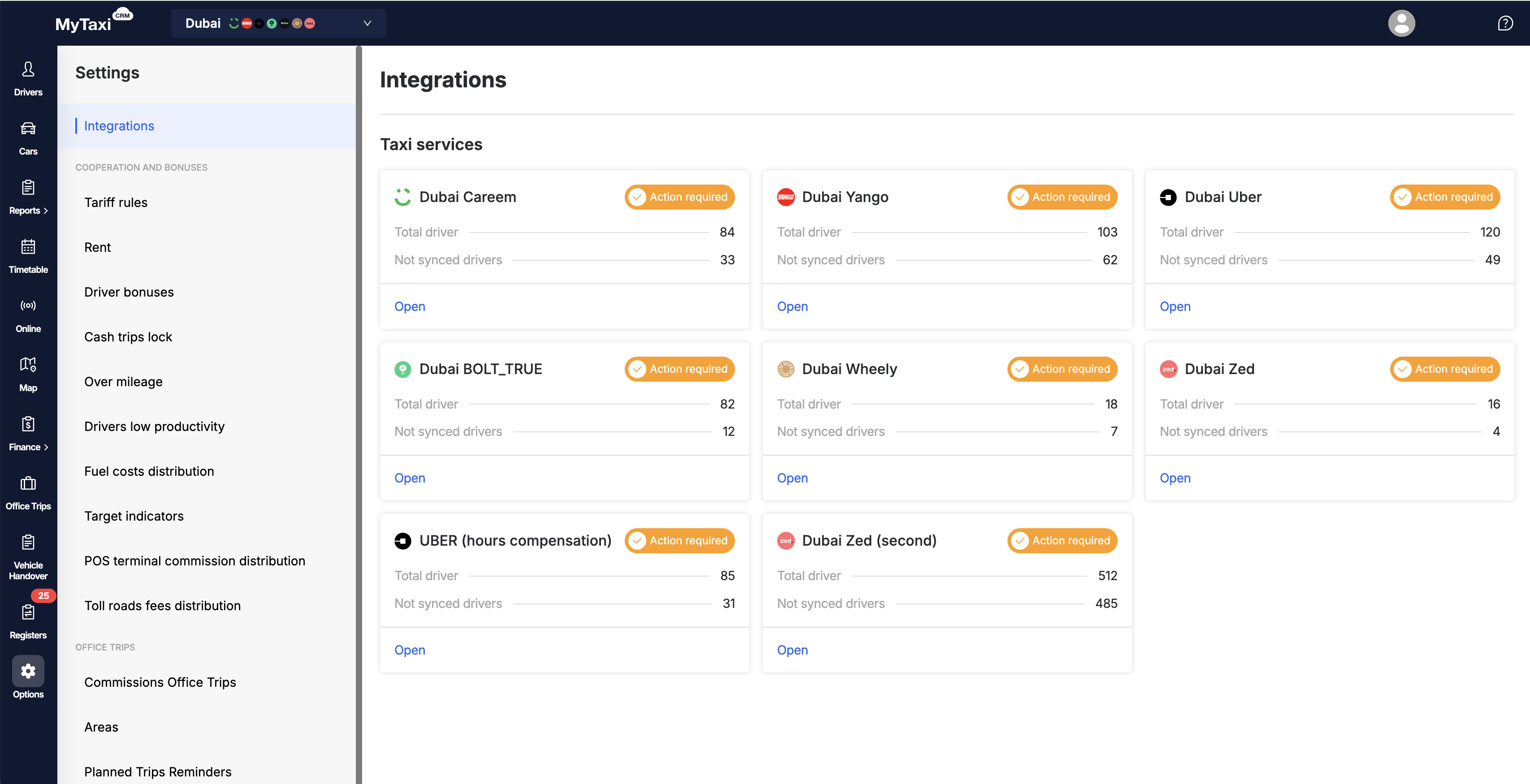
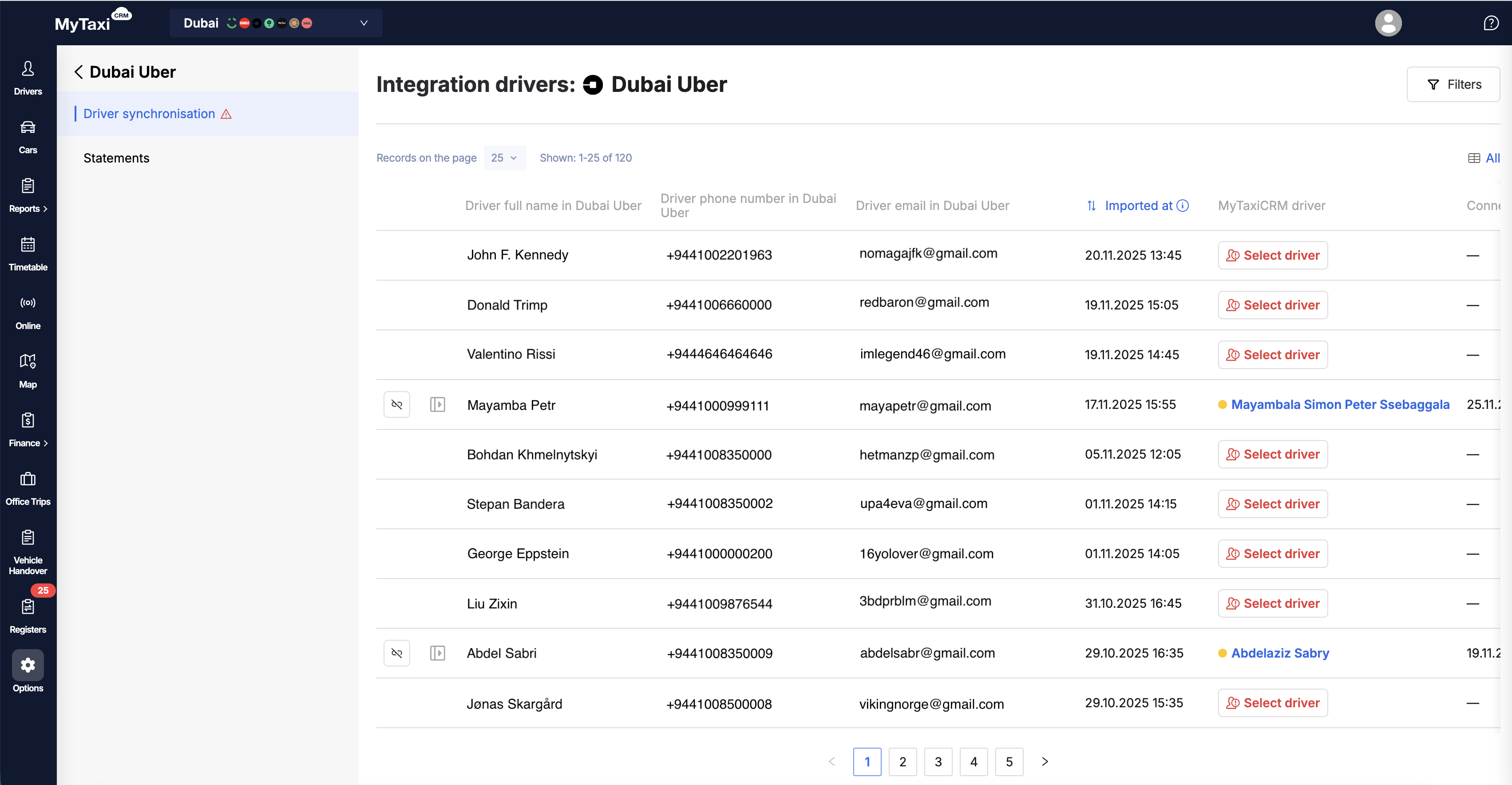
- Drivers synchronization between MyTaxiCRM and integrations:
- The driver account DB sync feature has also been moved to the newly updated «Integrations» section;
- Lists of drivers for all integrations have appeared; the tool's usability has been improved;
- From now on, it is possible to connect/disconnect/reconnect each of the integrations from the panel in MyTaxiCRM;
- For each added driver, the MyTaxiCRM system will offer a choice of how to work with his/her reconciliation: without recalculation, with recalculation (Revise) for the current week, with recalculation for the last 10 weeks;
- Detailed information about the driver's income on the specific integration side is also available here;
- Alerts about the need for a sync have been moved directly to the general list of drivers and to the dashboard of the section.
👇 All-round update* of the «Revise» section (side menu → ⚙️ Finances → Payroll & Balances):
- The «Revise» section has been completely redesigned and is now called «Payroll & Balances». The goal of MyTaxiCRM’s dev team is to make financial flows more transparent by separating earned funds from actual payments, as well as to provide a detailed understanding of what constitutes a driver’s income & fleet profits.
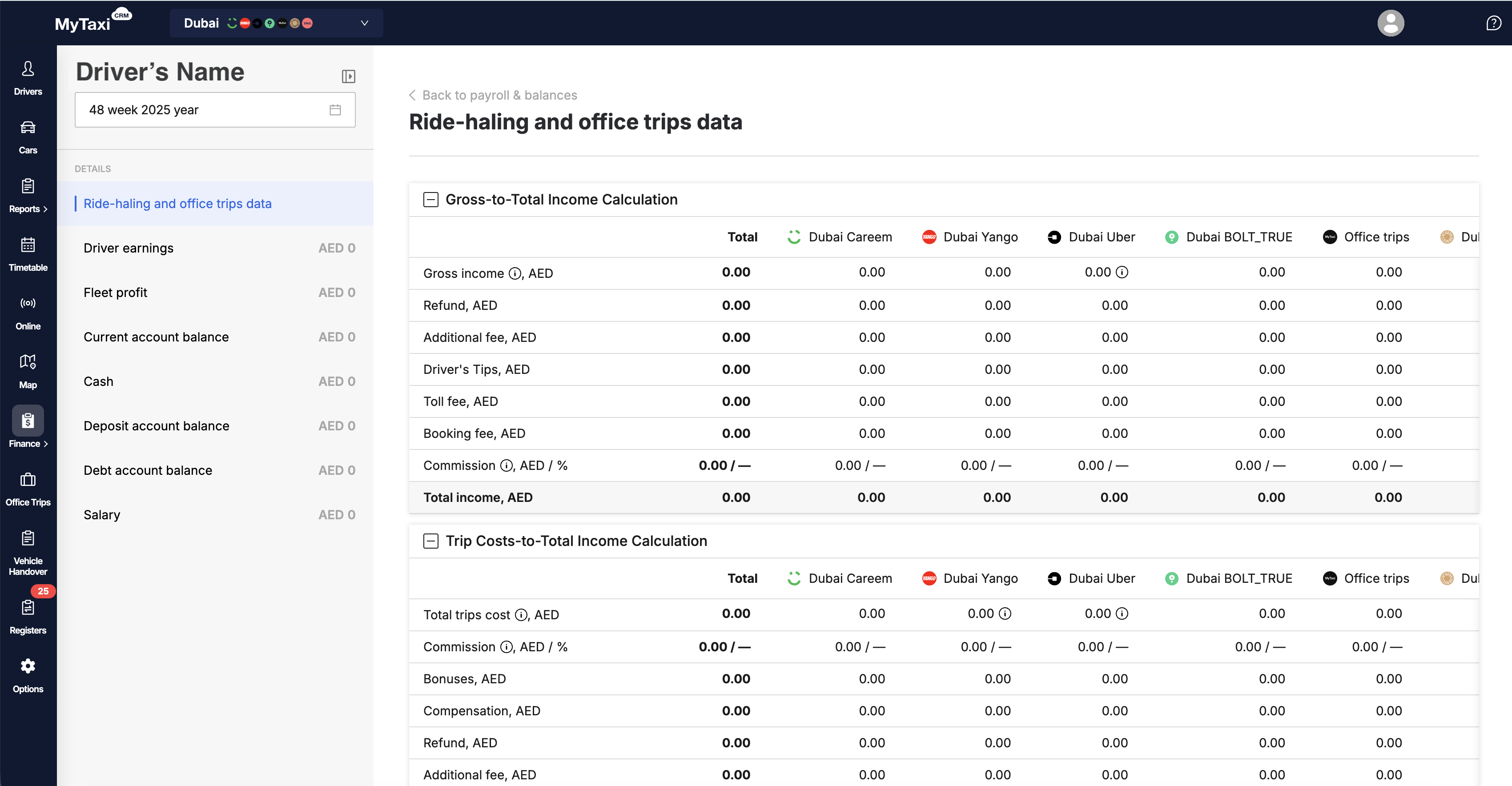
⚠️ The updated «Payroll & Balances» section is only available to certain MyTaxiCRM fleet users who have agreed to help with intensive testing. For all other our customers, the «Revise» section will remain available in its old form until the new one is ready for full deployment.
- New structure & navigation – reconciliation's details are now displayed on a separate page. Each component is displayed in a separate tab with detailed breakdowns (menu on the right). Convenient switching between weeks has been added;
- Driver's Earnings – shows the total amount earned by the driver for the selected period (percentage from rides, bonuses, tips, etc.), regardless of payouts received;
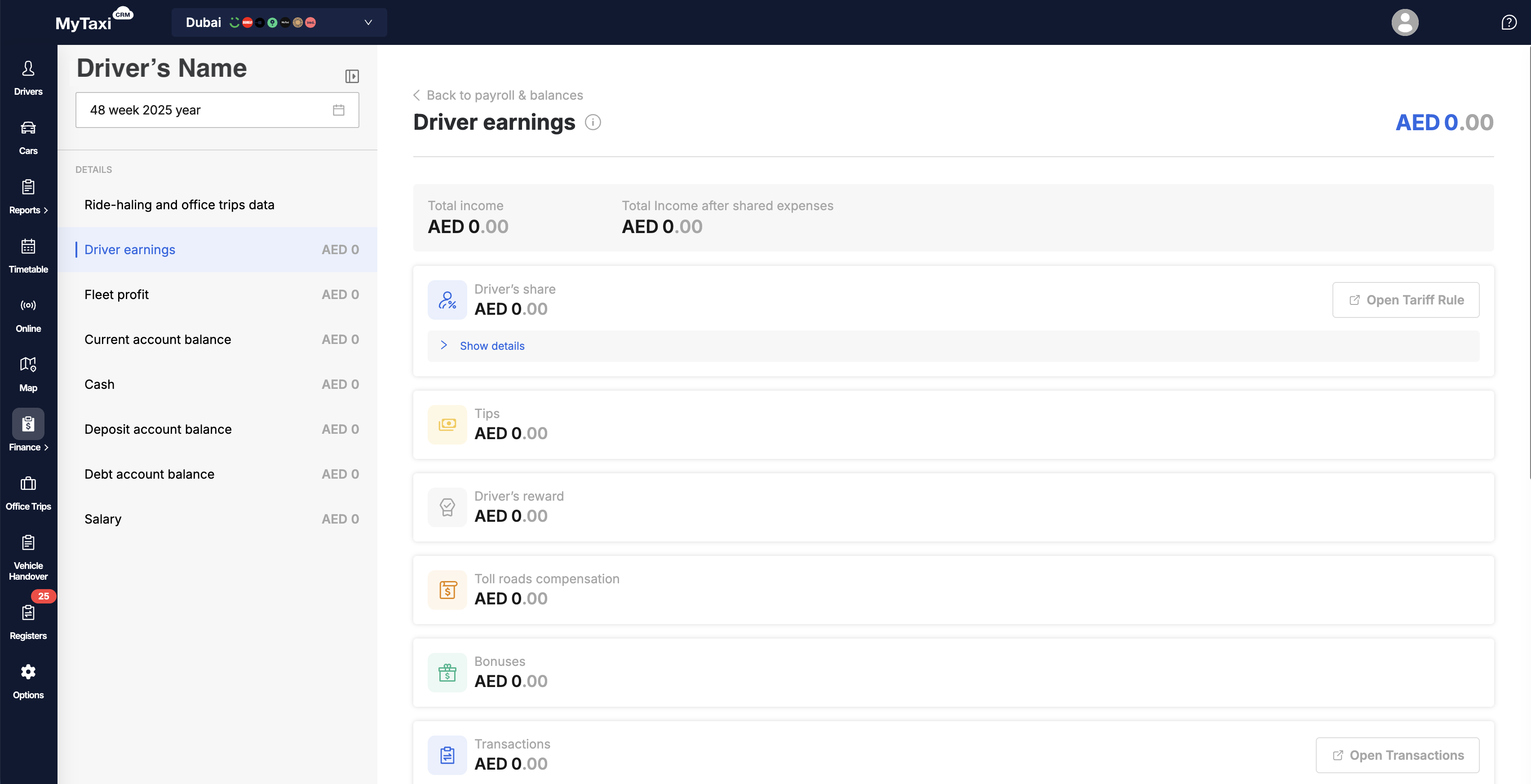
- Current Account – reflects the actual balance payable to date. All transactions, cash payments, write-offs, and transfers are taken into account here;
- Driver's Share – added visualization of the percentage calculation tiers for the driver with absolute values;
- Ride-hailing platforms & services alike – unified data representation. Tolls, tips, and cancellation fees are now displayed consistently, with clear hints about whether they are included in the gross income of a particular platform/service;
- Fleet Earnings – a separate tab where all components of its profit are collected: fleet's commission, bonuses, deductions for expenses & penalties, etc.;
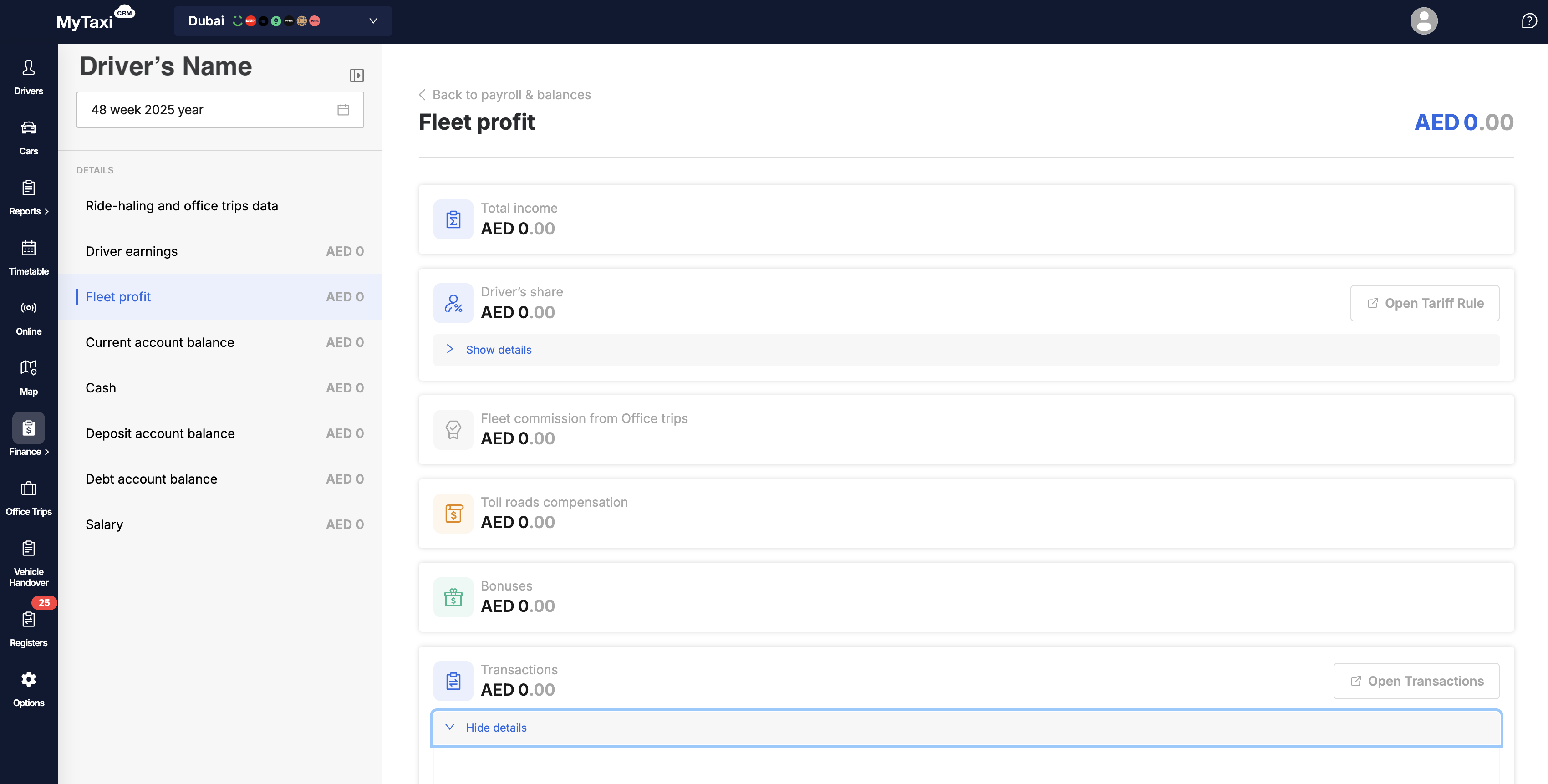
- New feel & look – the design of tables has been revamped, summary values for all blocks have been added; row names have become clearer (for example, we explicitly indicate whether toll roads are included in gross income).
- Improvements to the «Office Trips» built-in dispatch for car fleets:
- A new «Car Model» field has been added to the trip price calculator. It is now possible to calculate the exact value of an order in advance based on the price matrix, even if the specific car and driver have not yet been assigned to it;
- When canceling a completed Office Trips order, a field has been added to specify a mandatory comment;
- Fleet administrators can now change the cost of Office Trips rides even after they have been completed in the corresponding section of MyTaxiCRM;
- Users with the TRIP_MANAGER_EXTENDED role are no longer allowed to create new Office Trips rides with a driver commission type.
- A filter by GPS device status has been added to the list of vehicles. Now you can easily select vehicles without a connected GPS device or with a specific integration.
- A button has been added to the over-mileage report's details that opens trip tracking in MyTaxiGPS in a new browser tab.
¶ 🗓️ WEEK #46
Full List of Upgrades 👉 LINK
- Planned improvements to (β) «Live Map» section:
- Added driver details to the map. From now on, when you click on a car in the side panel, details about the driver assigned to the selected vehicle according to the Schedule and the latest Handover Act will be displayed;
- The list of vehicles now only displays those for which GPS integrations are configured and active (corresponding hints have also been added);
- Access to the section is open to users with SUPERVISOR roles.
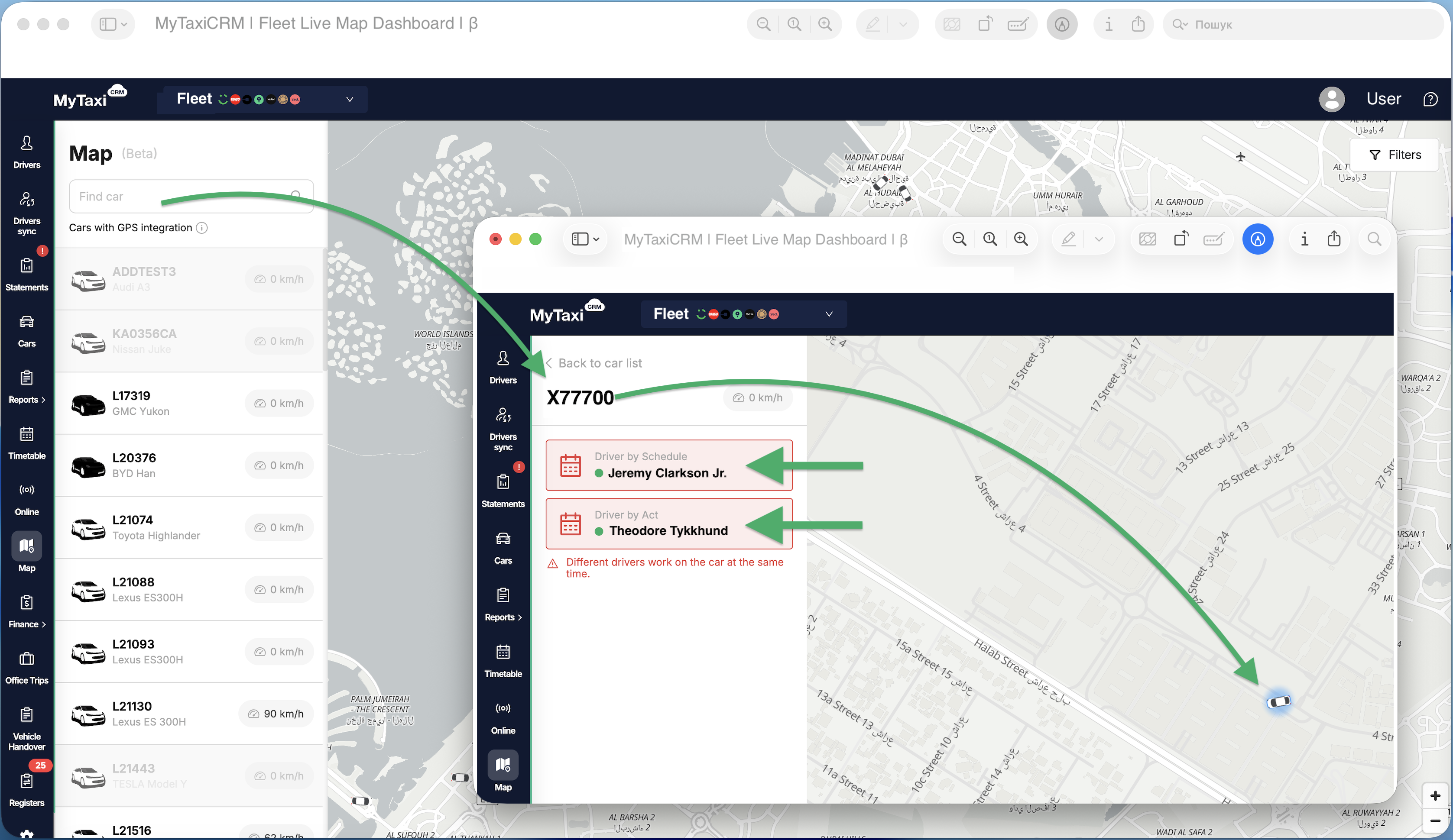
(!) Please note: this feature is in early release and is constantly being refined, so minor technical difficulties may occasionally occur. It is also worth noting that other useful elements & indicators (such as integrations' statuses, details from GPS devices, etc.) will soon be added to the map – our team is working to give you another great tool for managing your vehicle fleet business!
- Minor UI/UX enhancements of various MyTaxiCRM system modules:
- Improved error messages when creating a new vehicle account card. Instead of a general Data filling error, the system will now display a detailed explanation of which field was filled in incorrectly;
- Improved indication for concurrent trips. Those pending start are now displayed with an exclamation mark icon, while those already started are displayed with a clock icon as before;
- A filter by driver status has been added to the «Income Report»;
- In Office Trips Areas, the system now informs you in which price matrix it is used. This will help you correctly remove the location from all related rules before deleting the location itself;
- Removed strict time sequence validation in «Planned Trips Reminders».
- Improvements for fleets operating under the Rent operating model (scheme):
- Added the ability to cancel a fine transaction created for exceeding the mileage limit on a rental (overmileage penalty);
- The driver 's card account has been updated with information about the next VUP (Vehicle Usage Payment) – the type of charge (daily/weekly) and the state registration number of the rented vehicle have been added.
¶ October
¶ 🗓️ WEEK #44
Full List of Upgrades 👉 LINK
- «Wheely» integration: optimized online status update parameters to reduce data update delays.
- «Bolt» integration: the ability to register drivers with your fleet's unique referral code from the system of ride-hailing platform has been added.
This option is currently only available to partner fleets operating with «Bolt» in Ukraine. 🇺🇦 - «ENOC» integration (specific to the 🇦🇪 United Arab Emirates market): improved error detailing during fuel register upload. In cases where the imported file contains incorrect data, the system will now specify exactly which rows and columns contain errors.
- Improvements to the «Office Trips» built-in dispatch module:
- Notifications for drivers have been improved. Now, when the departure time for scheduled trips changes, the new start time will be clearly indicated;
- Added a hint informing that Office Trips ride older than 10 weeks cannot be canceled;
- The buttons in the Office Trip order cancellation dialog box have been renamed: instead of two different «Cancel» buttons, «Yes»/«No» are now used.
- Other technical improvements to the functionality, modules, and UI/UX of the MyTaxiCRM system:
- At the system level, support for a new region – Sri Lanka 🇱🇰 – has been added (currency, data formatting features, etc.);
- Users with the ADMIN role can now also create and configure «Planned Trips Reminders»;
- Updated design of income and trips reports. Fixed a visual flaw that could cause the total amounts in reports to not fit in a cell;
- Improved visual presentation layouts when loading data in the «Statements» section, «Requests» table & «Dismiss Driver» menu;
- The restriction on specifying the year of manufacture in the vehicle account's card has been lifted. Now you can specify the desired YoP that corresponds to the one indicated in the vehicle registration certificate document.
¶ 🗓️ WEEK #42
Full List of Upgrades 👉 LINK
- UI/UX improvements to the Office Trips dispatch center: automated alerts for management staff have been added. From now on, the system will highlight trips that require immediate attention (e.g., overdue) in red, and those that may require intervention in the near future in yellow. This will help to quickly identify problematic or potentially troublesome orders and respond faster.
- Confirmation of trips with Contractor payment: from now on, such trips will automatically receive the «Pending review» status upon completion. The income from them will be included in the driver’s revise only after the manager uploads a document confirming the proof of payment from the counterparty to the system.
- Improvements to the toll road registry: the ability to skip (ignore) lines in it has been added. If, after uploading the corresponding file, there are unnecessary or incorrect lines detected, they can now be deleted manually before applying the registry. This allows you to process even those documents where the data does not match exactly.
- Connection with «ENOC» (specific to the 🇦🇪 United Arab Emirates market): new template (vipselect.enoc.com) support added for uploading fuel registers from the «Emirates National Oil Company» («ENOC») supplier.
- Driver's personal cabinet functionality: upon completion of the current trip, the driver will see the details of their next assigned order.
- Other minor improvements & fixes to the algorithms and functions of the MyTaxiCRM ERP & BI system:
- The appearance of some drivers' selfies, which previously could be displayed with distorted aspect ratios, has been fixed;
- Fixed scaling of PDF receipts. Text in generated documents will now be the correctly sized (becoming more readable);
- For users with the MANAGER_EXTENDED role, the ability to change tariff rules in driver's cards is restricted now;
- The mileage (kilometrage) in the «Online» section and other related parts of the system is now displayed with an accuracy of decimals (for example: 10.5 km);
- If the system detects a vehicle that is not added to the fleet when loading the fines and/or fuel registers → it will notify you (the error message will contain its numberplate);
- When creating a «Crew» event in Timetable with the «12 through 12» mode of operation, the system now displays an additional +1 day hint for the 2nd crew member, making planning more intuitive.
¶ 🗓️ WEEK #40
Full List of Upgrades 👉 LINK
- «Network» integration improvement (a payment solutions provider common in the 🇦🇪 UAE): driver identification by Terminal ID has been added to the «Network» registers and the driver's profile cards in MyTaxiCRM. Now you can choose how the system will identify the driver when processing the «Network» register – either by the Terminal ID linked to the car (as before) or by the Terminal ID linked directly to the driver's record. This ensures more accurate identification, especially in cases where drivers work on different vehicles.
- Another improvement/enhancement of the built-in Office Trips dispatching functionality:
- You can now tick the «Mandatory Trip» checkbox when creating a trip from the MyTaxiCRM panel. Such an order will be obligatory for the assigned driver (without the option to reject it);
- Drivers will no longer be able to submit price review requests for Office Trips that utilize the «To Сounterparty» payment method;
- A filter by pickup time has been added to the Office Trips list table, simplifying the search for pre-planned orders for a specific date & time;
- A filter for overdue trips has been added, allowing you to quickly highlight all orders with the «Unassigned» status that should have already started.
- Fixed an issue that could cause a driver's online status to freeze after completing an Office Trips trip.
👇 New section (β) «Live Map» in the MyTaxiCRM system has been added (left side menu → 🗺️ Map): on this page, you can track the location of all your cars in real time on an interactive map, allowing you to visually assess their location.
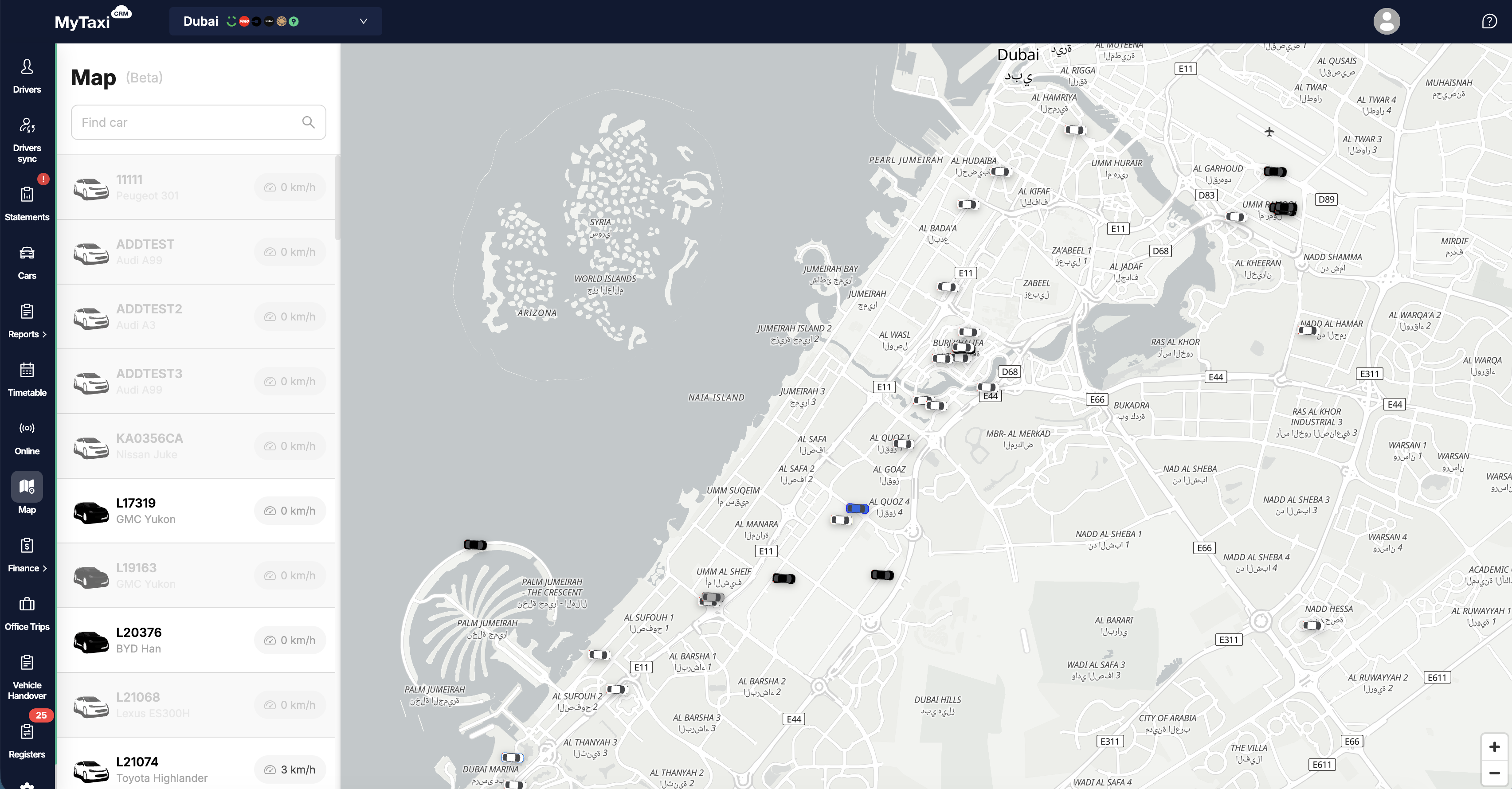
(!) Please note: this feature is in early release and is constantly being refined, so minor technical difficulties may occasionally occur. It is also worth noting that other useful elements & indicators (such as integrations' statuses, details from GPS devices, etc.) will soon be added to the map – our team is working to give you another great tool for managing your vehicle fleet business!
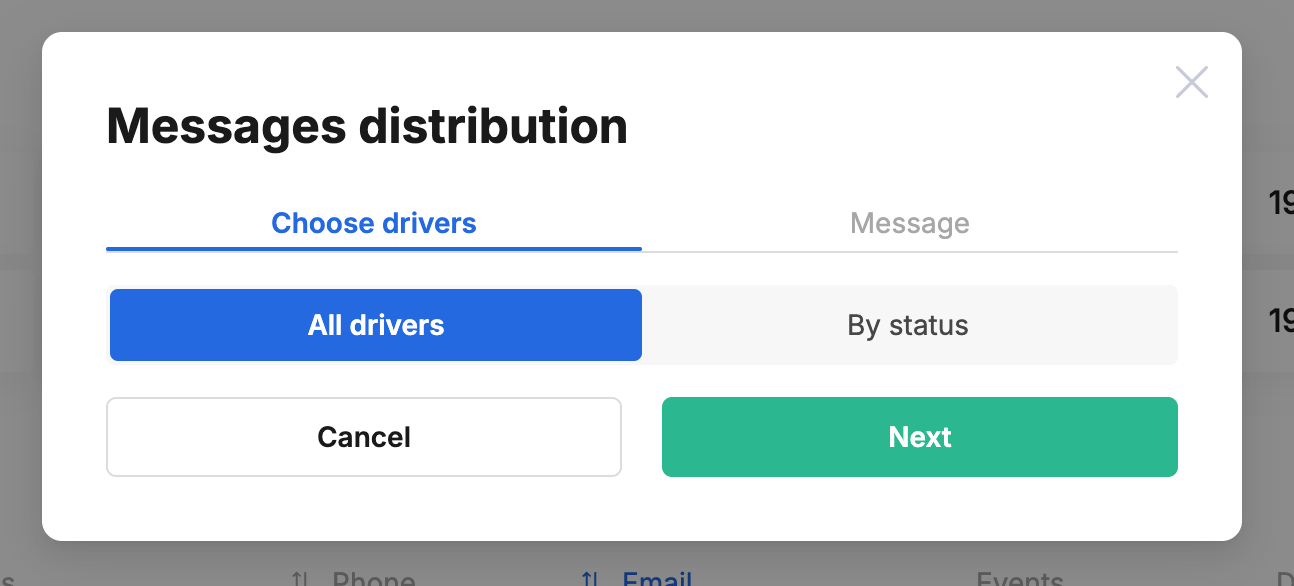
- Communication with drivers: added the ability to create and bulk send important notifications to target groups of drivers directly in Telegram. Now you can either set up these messages for all drivers at once or filter out a specific group based on their status.
- «Wialon» integration improvemen (GPS tracking solution provider with 🌐 global coverage): added support for readings from seat sensor(s) indicating the presence/absence of passenger(s) in the vehicle's cabin.
- The main page of the driver's personal cabinet app now displays a new block with details of upcoming scheduled trips.
¶ September
¶ 🗓️ WEEK #38
Full List of Upgrades 👉 LINK
- New feature (especially useful for rental fleets): automatic payments for vehicle usage. A «Vehicle Usage Payment» tab has appeared in the driver's profile, where you can set up the terms of automatic payments: specify the amount, frequency, and binding to a specific vehicle. The system will automatically conduct transactions, and you will be able to track the entire history and, if necessary, make changes or correctly end the payment period(s).
- Improvements to the functionality of Planned Trips in Office Trips: now the driver will instantly receive a Telegram-notification about a new trip assignment. In addition, the manager can set up a series of automatic reminders that will be sent to the driver before the start of the order to reduce the risk of missed or unconfirmed orders.
- Communication platform designed to enable Fleet ⮂ Driver engagement: we have added a built-in chat feature to the Driver's Personal Cabinet, allowing drivers to communicate directly and quickly with fleet managers. Managers can now respond to questions centrally and customize the contact form, improving communication within the fleet organization.
- Improvements to the Filters::
- A filter for driver status (such as «active», «fired», etc.) has been added to the «Trips Report Card» & «Driver's Report Card» reports.
- The movement report now includes the option to filter out movements that do not represent unregistered trips but during which the seat sensor was active. It is also possible to filter out movements during which the seat sensor did not transmit any data.
- Integration with «Bolt» ride-hailing platform:
- Improvements in the integration's connection process – the system now clearly informs users which login and password to use;
- Support for «Bolt»'s Public API has been implemented to obtain drivers' online statuses.
- Another (β) Public Rest API improvements: new endpoints have been added for viewing salary rules, their linkage to drivers, and obtaining information about tariff conditions in general.
- Other minor improvements to the UI/UX and algorithms (logic) of the MyTaxiCRM system:
- Updated logic for working with driver selfies (portrait photos);
- A new option has been added to the list of payment destinations: «Advertising services in/on cars»;
- It is now possible to change the name of a previously connected integration;
- Improved visual representation when loading data in the «Онлайн» & «Driver's Revise» sections.
¶ 🗓️ WEEK #36
Full List of Upgrades 👉 LINK
- Advanced vehicle movement tracking has been added. From now on, it has become much easier to detect unauthorized trips (those potentially made by a fleet vehicle outside the «cash register»).
In addition, we welcome feedback on our algorithm for detecting and identifying unauthorized trips. Your feedback will help us improve the recognition algorithm so that in the future it will be even more accurate in spotting suspicious orders and reducing the number of errors in the corresponding report. We keep working on a beneficial anti-fraud tool for you.
👇 A thorough update of the built-in Office Trips dispatching module:
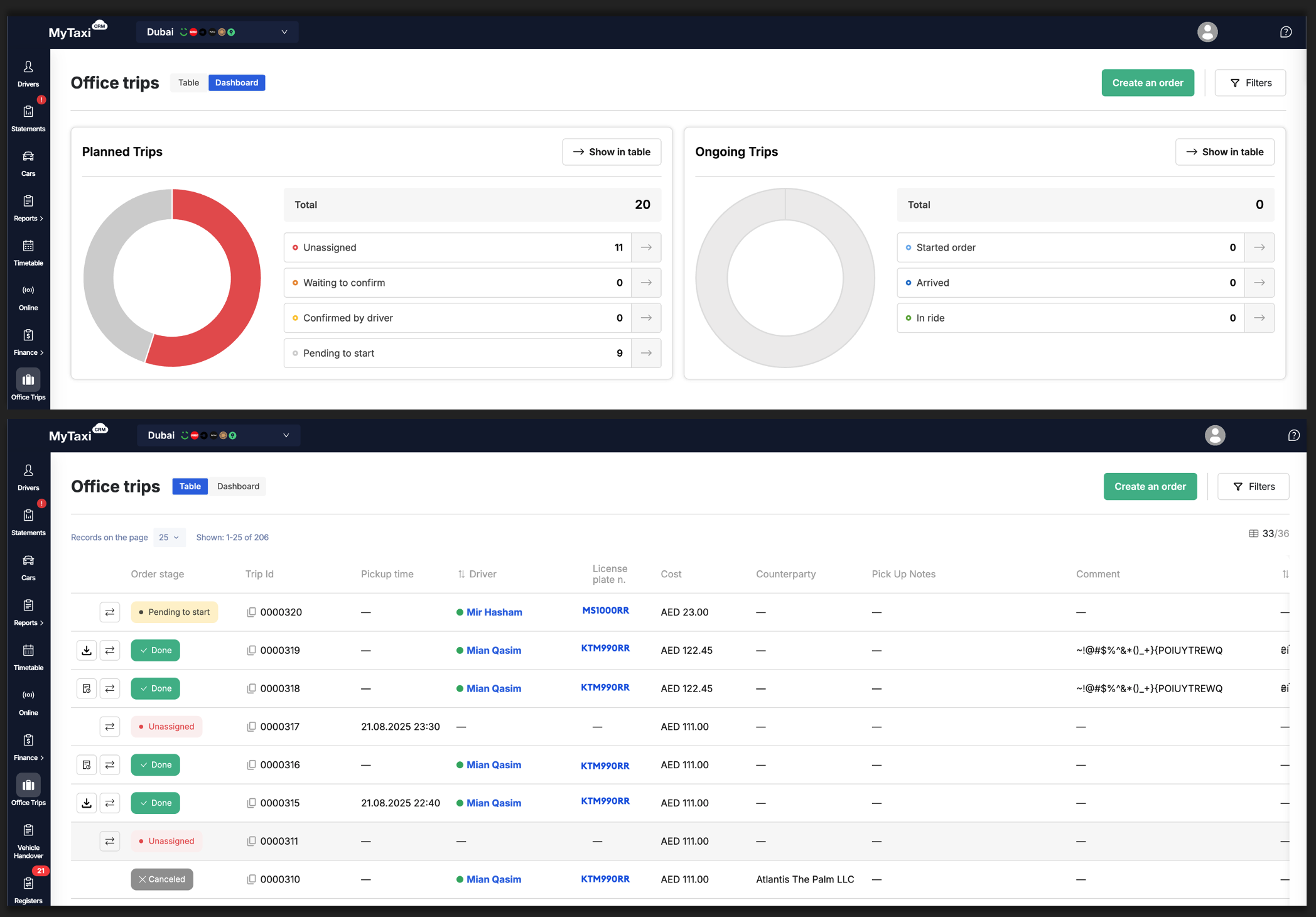
- A new tab called «Dashboard» has been added to the Office Trips section of the MyTaxiCRM system. It is an information panel that displays the numbers of planned orders and current trips in real time. This complements the functionality of previous improvements to the Office Trips module so that planned trips are also clearly visible to your fleet's operational staff.
The information displayed on this dashboard does not depend on the filters set and always reflects the current status of Office Trips (both current and scheduled) for the entire fleet. The screen can be accessed using the blue toggle button at the top left of the corresponding section of the system (your MyTaxiCRM account → specific fleet level → «Office Trips» button in the vertical menu on the left → «Table» ⮂ «Dashboard» toggle). - Updates to the overall structure and UI/UX elements of the «Table» tab in the Office Trips section of the MyTaxiCRM system (appearance of buttons, statuses, and other graphic elements) for better readability & ease of use.
- Price Review for Office Trips from the driver's personal cabinet: added the ability to select from a list and create such a request for an already completed trip directly from the personal cabinet app.
- The Office Trip cancellation button has been moved to the general action menu for convenience.
- Further (β) Public Rest API improvements:
- the ability to specify the commission recipient has been added to the Office Trips creation method;
- an endpoint for creating completed Office Trips has been added;
- new endpoints have been added for working with owners and brands(makes)/models of vehicles, as well as designated drivers for cars.
- Integration with «Bolt»: updated request for statements from the «Bolt» ride-hailing platform (via Private API) to ensure stable integration across all markets.
- Integration with «Uber»: improved harmonization of so-called «transitional» trips from the «Uber» ride-hailing platform (those that begin at the end of the previous day [24h] and end at the beginning of the next), ensuring more accurate synchronization, display, and further analysis of such information. The system has also been adapted to the new logic of data capture via the Uber API.
- MyTaxiCRM system user roles: persons with the «Owner» role for a vehicle fleet account in the MyTaxiCRM system are now allowed to perform bulk actions with «Requests» (in «Finance» section), such as confirming, paying for, and/or canceling multiple entries at once.
- Updates to the «Timetable» section: logic for selecting dates & time intervals. When creating a new event, the system will automatically suggest filling in the empty space between two existing events.
¶ August
¶ 🗓️ WEEK #34
Full List of Upgrades 👉 LINK
- New capabilities: we have added our own sub-product – a dedicated GPS solution from MyTaxiCRM (gps.mytaxicrm.com) тand integrated it into our core system so that every fleet that needs GPS tracking and location data for its vehicles can use this off-the-shelf service in combination with all the other modules & features available.
Please reach out to your MyTaxiCRM sales manager or technical support specialist for more info on how to get started and what's possible with this solution. - Improvements to the built-in dispatch Office Trips module: all updates regarding the status or stage of Office Trips journeys from the driver or fleet manager side in fleet's account will now be updated live & automatically, without the need to manually refresh the page each time.
- Pre-planned trips will also appear in the driver's personal cabinet automatically.
- UI/UX refinement:
- From now on, the system will remember the table sorting settings and will not revert to the default ones when pages are refreshed;
- The term (and corresponding button(s) and/or menu item(s) names) has been changed from «Average Check» → to «Average Trip Price» to better reflect the meaning of the metric.
- «Online» section: updating most UI/UX elements to improve visual perception of information.
- «Handover Acts» section: updated visual elements to make it easier to see active acts in the list at a glance.
- Automatic translation: the message header in the linked Telegram conversation with the driver is translated into the user's language.
- Integration with «Bolt»: from now on, the driver's public ID is also synchronized between MyTaxiCRM and the fleet's integration with «Bolt».
- Integration with «Uber» (specific to the 🇫🇷 French market): added processing of statements for integration with «Uber».
¶ July
¶ 🗓️ WEEK #32
Full List of Upgrades 👉 LINK
- Driver communications: a new tool has been added for fast and direct communication with drivers without having to leave the system. From now on, managers can send text messages to one or all linked driver accounts in the Telegram app directly from their card(s) in MyTaxiCRM.
- (β) Public Rest API improvements: existing datapoints have been expanded and new ones added:
- Regarding driver profiles in MyTaxiCRM: the basic datapoint has been expanded; a new one has been added with information about the driver's available documents (drivers/docs).
- Regarding vehicle profiles in MyTaxiCRM: the basic datapoint has been expanded; a new one has been added with information about available documents for vehicles (vehicles/docs).
- Improvements to the functionality of the built-in «Office Trips» dispatcher: a module for generating invoices (receipts) for «Office Trips» has been added. You can now automatically create and download receipt files (.pdf) for completed (finished) corporate trips in MyTaxiCRM.
In the new «Settings» section, you can now specify your vehicle fleet company's details for such invoices (receipts).- When creating a scheduled trip, you can now add a multi-line comment called «Pick Up Notes» with important information for the driver. This note will be visible to the driver in the «Office Trips» order's details.
- MyTaxiCRM now takes into account not only the start time but also the expected duration of the trip along the route to prevent overlapping orders from being assigned to the same driver(s).
- Updated UI/UX elements of the built-in «Office Trips» dispatcher.
- Toll road registers: added the ability to download toll road registers even if the driver was not automatically assigned during synchronization. Assigning or changing drivers manually is also available from the registers' control panel. New options «Toll Roads Fees Distribution» & «Proportional Distribution» have been added for more flexible toll road expense accounting.
- Integrations with «Uber», «Bolt» and «Wheely» ride-hailing platforms: status change history displaying has been restored.
¶ 🗓️ WEEK #30
Full List of Upgrades 👉 LINK
- Planned Trips: the Office Trips section has been significantly expanded and now supports the full lifecycle of pre-orders. The new functionality allows creating trips in advance, flexibly managing their statuses, and ensures closer real-time interaction between the dispatch/fleet manager and the driver.
- Planning and management: ability to create trips in advance (for particular date/time), with or without assignbing them to drivers.
- Statuses with UI/UX improvements: new statuses (e.g. «Waiting for confirmation», «Confirmed by Driver») have been introduced to Office Trips system with clear color coding, allowing dispatchers to easily track the lifecycle of each order created.
- Imorivement flexibility: dispatchers now have more control, including the ability to edit the vehicle arrival time for scheduled (planned) trips and to forcibly complete active orders.
- Drivers' personal cabinet app improvements: added ability to decline incoming order request – reviously, they had the option to either accept or ignore (not respond to) such requests. Separate list for future (planned) orders has been added into «Dashboard».
- Reports improvement: «Bonus Program Performance» report has been improved by adding detailed conditions' breakdown view.
- Fraud prevention (a.k.a. «Fraud Trips»): an algorithm has been implemented to identify and flag potentially fraudulent trips in the «Fines for Overmileage» report. For trips marked as suspicious, an informational tooltip is now displayed in the report details.
This feature is compatible with GPS-equipped vehicles that include passenger seat sensors installed. - «Bolt» real-time profit calculation via Open API. An alternative method for calculating real-time profit for «Bolt» platform via the Open API has been implemented, enhancing data stability & accuracy.
- «Bolt» ride-hailing platform integration: from now on, you can assign unique names (labels) to each of your identical integrations (for example, if you have two «Bolt» accounts) to make it easier to distinguish between them in reports.
- «Online» section improvements: MyTaxiCRM now can calculate & display driver's «waiting time» (in addition to «time online»); include it into «Driver Report Card».
- Vehicles: plug-in hybrid (PHEV) variant added as a fuel type to the corresponding list. Added «Engine Number» & «Chassis Number» fields to the vehicle card (profile).
- (β) Public Rest API improvements: online statuses dataopoints has been extended to include the driver's shift start time.
- Various bug fixes: bonuses duplication; «Crew» event («Timetable»); driver's balance. vs. cancelled Office Trips; «Uber» vehicles' data sync issues.
¶ 🗓️ WEEK #28
Full List of Upgrades 👉 LINK
- Improvements to «Timetable» («Schedule»), «Vehicle Profile» & «Vehiles Handover»: introducing the new «Crews» feature, designed for fleets where a single vehicle is used by a team (e.i. crew) of multiple drivers. This functionality allows you to formally assign a vehicle to a group of drivers directly, increasing transparency and simplifying the shifts change process.
- «Uber» ride-hailing platform integration: automated «Car ⮂ Driver» assignment via Handover Act added. Now, when creating a Handover Act, the system can automatically assign certain vehicle to a driver within the ride-hailing service. The functionality is optional and can be enabled or disabled for MyTaxiCRM users as desired.
- «Bolt» ride-hailing platform integration: improvenets for bonus calculations. Added the ability to create multi-level bonus programs (per target), in which a bonus will be calculated & applied automatically when the driver meets a set of requirements based not only on the number of trips finished but also on key performance indicators (KPIs) from «Bolt» side, such as order acceptance rate (AR) and/or online hours (OH).
- «Careem» ride-hailing platform integration: reporting improvements for toll roads. Support for extended report files (.xlsx) added.
- Please, note: to activate this feature support you must set up redirects for emails containing such report files from «Careem» (and additionally submitting a request to receive such reports if you do not currently receive them on a regular basis). Manual HERE
- Overrun calculation: updated algorithm, based on sum of driver's trips.
- New integration: GPS.AZ provider added (specific for 🇦🇿 Azerbaijani market).
- Expanded permissions for the «Owner» role for MyTaxiCRM users. Added new features & possibilities, the ones that were only available to «Admin» role.
- (β) Public Rest API improvements: real-time driver's vehicles GPS data exchange added.
¶ June
¶ 🗓️ WEEK #26
Full List of Upgrades 👉 LINK
- Updated «Driver Report Card» UI design, added breakdown by integrations: the «Total income», «Total cash», and «Total trips» columns now display summary totals, which can be expanded (by clicking on them) to see a detailed breakdown by each ride-hailing, taxi and/or dispatch services.
- Added accounting for direct payments from ride-hailing platforms to the driver: «Direct payment» line has been added to the driver's «Revise». It allows for the correct accounting of funds that the ride-hailing pays directly to the driver, without the fleet's involvement. The functionality is available specifically for the «Uklon» integration at the moment (specific for 🇺🇦Ukrainian market).
- Improved workflow for Fines' Registries: they now can be uploaded to the system without a pre-filled schedule or a history of vehicles issued via handover acts. The responsible driver can be assigned or changed later within the registry interface. Statistics have been added to track the number of fines matched and unmatched with drivers.
- Migration to «Bolt» Open API for vehicle synchronization accomplished.
- Optimized route calculation algorithm for GPS «DT»: the accuracy of determining vehicle mileage (kilometrage) intervals without active trips has been improved.
- Technical optimization of «Office Trips» has been carried out to improve the stability of reports and payrolls.
¶ 🗓️ WEEK #24
Full List of Upgrades 👉 LINK
- Tariff rules catalog: a new feature has been implemented that allows creating, managing, & assigning presets of tariff rules for drivers. This provides flexibility in managing cooperation terms & futher automates calculations:
- Rule Creation – ability to create multiple unique tariff rules at the fleet level;
- Flexible Assignment – rules can be assigned to individual drivers or as a default preset for the entire fleet;
- Convenient Management – rule's card displays a list of drivers assigned to it, and the driver's card shows their current (assigned) tariff rule;
- Further Recalculation Automation – editing a rule automatically triggers a recalculation of reconciliations for all associated drivers;
- Catalog Organization – rules in the catalog can be sorted & deleted (this functionality replaces & expands the previous «Cooperation Terms and Bonuses» section).
- Informative dashboard with key performance indicators has been added to the «Driver Timesheet» report for quick visual assessment.
- (β) Public Rest API Implemented: endpoints have been added for deeper integration with third-party systems & process automation.
¶ May
¶ 🗓️ WEEK #22
Full List of Upgrades 👉 LINK
- «Wheely» service integration: synchronization of trips, drivers, and vehicles.
- «Wheely» service integration: synchronization of data for driver payrolls.
- «Wheely» service integration: display of driver online statuses & real-time profit data synchronization.
- «Wheely» service integration: accounting for fleet payments to the bank account.
- Added a «Show recent acts» toggle, which is enabled by default. When activated, it displays only the last active (not cancelled) handover act for each vehicle, reflecting its current condition and the responsible driver.
¶ 🗓️ WEEK #20
Full List of Upgrades 👉 LINK
- Added information about vehicle «Stop» (idle) periods to the overrun report details. its current condition and the responsible driver.
- Added the ability to display your company's logo in the Driver's Dashboard to enhance corporate style & recognition.
¶ April
¶ 🗓️ WEEK #18
Full List of Upgrades 👉 LINK
- «Wialon» integration: added support for the new GPS provider («Wialon»).
- «Uber» integration improvements: «Uber» integration can now be connected independently in the «Settings» section by providing the necessary API keys.
¶ 🗓️ WEEK #16
Full List of Upgrades 👉 LINK
- «Wialon» POS payments processing: system automatically imports transactions, matches them with drivers (based on the terminal ID in the car card and vehicle handover or scheduler), and applies them to the driver's balance, considering flexibly configured acquiring fees.
- Added integration with «EtisalatDigital QAT» GPS.
¶ March
¶ 🗓️ WEEK #14
Full List of Upgrades 👉 LINK
- Added the ability to upload the road fine registry directly from original «RTA» report files (.xls) for UAE (Dubai) market.
- «Bolt» integration improvements (specific for 🇦🇪 UAE and 🇵🇱 Polish markets): adjusted the accounting for «Other Expenses» & Toll Roads. The Trips total cost is now calculated excluding Booking fees.
- Driver's Portal UI Improvement: in an active Office Trip order, confirming actions (like completing the order) now uses a button hold action (Hold) instead of a swipe action (Swipe), ensuring more stable operation across different browsers.
- Automatic Driver Assignment for Registries: added a setting that allows the system to link transactions from registries («Salik», «RTA», fuel) to a specific driver based on data from the Vehicle Handover Act.
- Note: to activate this setting for your company (fleet), please contact support.
¶ 🗓️ WEEK #12
Full List of Upgrades 👉 LINK
- Added the ability to connect «Bolt» integration via Options section.
- Added the ability of Driver registration in the Telegram bot via a invite link.
- The toll road registry can now be created using the original «Salik» report file (.xls).
- Added the ability to configure target indicators for report in colors.
- The «Finance» section of the Driver's Portal now displays the driver's deposit & debt.
- The value in the Current Account for the relevant week of driver's Revise is now displayed in the «Balance» block in the Driver's Dashboard side panel.
- System's email inbox address is now available in the Options section for forwarding «Careem» notifications.
¶ 🗓️ WEEK #10
Full List of Upgrades 👉 LINK
- Office Trips section added to the Driver's Portal.
- Ability to specify vehicle battery level (state of charge) for BEV in the Vehicle Handover Act.
- Option to delete future vehicle events in the schedule added.
¶ February
¶ 🗓️ WEEK #8
Full List of Upgrades 👉 LINK
- Added the ability to сonfigure fields in the Vehicle Handover Act.
- Multiple event selection in the Schedule (Timetable) added.
- Step-by-step Office Trip data notifications in Telegram bot added.
- Integration with «QAT» GPS data added.
- Added the ability to connect «Careem» integration via Options section.
¶ 🗓️ WEEK #7
Full List of Upgrades 👉 LINK
- New transaction registries: two new types of transaction registries have been introduced – Toll Road paid by the company (1) & Company Traffic Fines paid by the company (2).
- Driver’s acc revise: two new tabs added – «Balance» (breakdown of the current account from driver revise; can be hidden upon fleet request) & «Income» (detailed earnings breakdown across ride-hailing/taxi/dispatching service platforms).
¶ January
¶ 🗓️ WEEK #4
Full List of Upgrades 👉 LINK
- Accounting for toll road compensations from the ride-hailing platforms: added the ability to account for toll road compensations from the aggregator in the driver's current account. The compensation accounting option in the «Fleet Profit» section is available for configuration at the fleet level.
- Fines have been renamed to «Driver’s penalties»: introduced the ability to add a new fine type to driver reconciliation – «Fleet Penalties» (the «Traffic Violations» type is available). This type of penalty increases the accounts payable to the counterparty to whom the fleet must pay the fine and allows for the reallocation of the fine payment to the driver.
- New transaction type «Toll Roads»: added the ability to deduct funds from the driver via Revise for toll road usage. This transaction reduces the fleet’s accounts receivable to the counterparty whose account automatically debits funds for tolls.
¶ 2024
¶ December
¶ 🗓️ WEEK #52
Full List of Upgrades 👉 LINK
- Creating a driver card from the «Bolt» integration is now optional: automatic card creation can be disabled at the fleet level. The «Bolt» integration will automatically be added to an existing driver's card if the phone number and email in the driver's card match those in «Bolt».
¶ 🗓️ WEEK #50
Full List of Upgrades 👉 LINK
- Added ability to associate stations with counterparties. Drivers can select a station to go Online. Stations can be linked to contractors for accounting the contractors commission for Office Trips orders.
¶ November
¶ 🗓️ WEEK #48
Full List of Upgrades 👉 LINK
- Detailed overrun penalties: introduced the ability to view detailed information about driver overruns, including start and end times of movement without a trip.
- Unified table design across the application: all tables in the application have been standardized according to a unified design system.
¶ 🗓️ WEEK #46
Full List of Upgrades 👉 LINK
- Updated driver's salary calculation algorithm: salary calculation rules now consider the driver's status and can be applied individually. Relevant fields have been added to the driver’s Revise.
- Ability to create corporate trips from the driver’s dashboard: now to create a corporate trip, the driver simply needs to select an Office Trips station associated with the counterparty as the trip starting or ending point from the dropdown list.
¶ October
¶ 🗓️ WEEK #44
Full List of Upgrades 👉 LINK
- Added ability to apply a commission to Office Trips: the commission for an Office Trip can now be allocated as compensation to a fleet, contractor, or driver. The commission amount can be customized individually.
- New payment type for Office Trips added: Added a new «Contractor» payment type to replace the «Corporate» payment type. This payment type directly affects the contractor's accounts receivable.
- New fuel cost allocation conditions added: 2 new fuel cost-sharing options have been added – «Fuel as a General Expense» & «Proportional Costs».
¶ 🗓️ WEEK #42
Full List of Upgrades 👉 LINK
- Individual settings for Drivers low productivity added: ability to set the amount and conditions of low productivity compensation for each driver individually.
¶ 🗓️ WEEK #40
Full List of Upgrades 👉 LINK
- Ability to display the vehicle mileage (kilometrage) for a selected time range in the Timetable.
- Conditions of Cooperation Calculator are expanded: added the «Type of Shared Income» setting, which allows calculating the driver's profit without aggregator (ride-hailing platforms') bonuses. Also added a setting for splitting aggregator (ride-hailing platforms') bonuses.
- Transaction Registers section update: Added the «Fuel Expense Distribution Conditions» setting for the fleet. In the driver's card, it's now possible to select personal distribution conditions.
¶ September
¶ 🗓️ WEEK #38
Full List of Upgrades 👉 LINK
- Transaction register update: new section has been added at the company level that allows for creating multiple transactions by importing a CSV-file (.csv).
- Now vehicle’s availability status per the Handover Act is displayed in the schedule.
- Added ability to resend the driver's registration request in the integration.
¶ 🗓️ WEEK #36
Full List of Upgrades 👉 LINK
- Filter panel added: a button has been added to each page that brings up a sidebar with all the available page filters.
- Added ability to change the password from the «Profile» section.
- Significant updates to Over-mileage & Drivers low productivity modules.
¶ August
¶ 🗓️ WEEK #34
Full List of Upgrades 👉 LINK
- New «Directories» section: new section now includes the Car Models directory and the Contractors directory has been moved there as well.
- Updated bank details validation for creating Non-Cash Payments: now the driver only needs to provide one of the following details: Card Number, IBAN, or Account Number (a new field added with this update).
- Expanded driver firing (dismissal) reasons: уach reason now includes a list of descriptions, one of which must be selected from the new dropdown list.
¶ 🗓️ WEEK #32
Full List of Upgrades 👉 LINK
- Synchronization of «Bolt» registration status: changes in the status of an application registration in «Bolt» will now be reflected in the driver's profile. For applications requiring document updates, a link to the «Bolt» app will be displayed. Additionally, the activation waiting time for the application has been added.
- Pending payments no longer affect «Previous Week's Balance»: in the driver's revise, the «Previous Week's Balance» field has been renamed to «Previous Week's Balance Excluding Pending Payments». Upon opening a new week, the amount of pending payments will be carried over from the previous week into a designated field.
- Significant updates to Over-mileage & Drivers low productivity modules.
¶ July
¶ 🗓️ WEEK #29
Full List of Upgrades 👉 LINK
- Added recalculation of Driver's report card and Trip/Income Reports when assigning Integration via Statements section: the system re-generates driver reports for all days where the integration was not assigned to the driver. The driver's trips and income will be added to the respective report days.
- System logic update: automatic Offline mode for Office Trips. The feature of automatically switching the driver to offline mode after exceeding the order waiting time limit of 15 minutes, in case the driver closes the Driver's dashboard page (personal cabinet app).
- «Looker Studio» report integration: unique company pre-build reports, based on «Looker Studio» product solution now can be displayed in the «Reports» section at the company level.
¶ 🗓️ WEEK #27
Full List of Upgrades 👉 LINK
- Vehicle Handover Act: automatic logging each vehicle handover procedure in the system. A vehicle can be handed over: from the fleet to the driver, from the driver to the fleet, or from one driver to another.
- Minor UI/UX improvements: added a phone number input component with country code selection.
¶ June
¶ 🗓️ WEEK #25
Full List of Upgrades 👉 LINK
- Multi-platform multi-source integration added: system will now can automatically add another account from the taxi service/ride-hailing platform to the driver's existing profile.
- Dynamic thresholds for cash trips blocking added.
- Added the ability of creating Office Trips from the Driver's portal: drivers now can independently create a trip request, which will immediately appear in the Driver's dashboard as an unfinished Office Trip.
- Major BE-optimization: we implemented advanced bundling and code-splitting techniques, reducing application load times and improving overall performance.
¶ 🗓️ WEEK #23
Full List of Upgrades 👉 LINK
- Drivers penalties for daily low productivity added: introduced a module that allows deducting certain amount from the driver's balance in favor of the fleet's profit for failing to meet daily trip targets or overall income goals.
- Vehicle Sync with Integration upon License Plate change: when editing a vehicle's license plate number, it will be forcibly synchronized with integrations. Ensuring that trips are not lost after a license plate change, even if the trips was made using the old plate number on the integration side.
- «Bolt» Fleet API v.2: updated the integration to the new «Bolt»'s API version, impacting all sections that used API v.1.
¶ May
¶ 🗓️ WEEK #21
Full List of Upgrades 👉 LINK
- Reworked storage of driver integrations' info: now system can support multiple instances of same integrations within a single driver’s profile.
- Ability to reset the password for the Driver portal added.
- Driver's connection status into Telegram added: the driver's profile now displays information about all Telegram accounts connected to the dedicated chat-bot.
¶ 🗓️ WEEK #19
Full List of Upgrades 👉 LINK
- Support for multiple identical integrations for same vehicle fix: resolving the issue of counting trips of duplicated cars on the integration side. MyTaxiCRM now synchronizes the vehicle with the integration correctly.
- Major BE&FE-optimizations: portal/website loading speed increased by up to 300% under slow internet connection conditions.
- Ability to cancel a completed Office Trip added.